15 Creative Ways to Use Invisible Characters on Social Media
Published September 29, 2026 · Invisible Character Copy

What counts as an invisible character
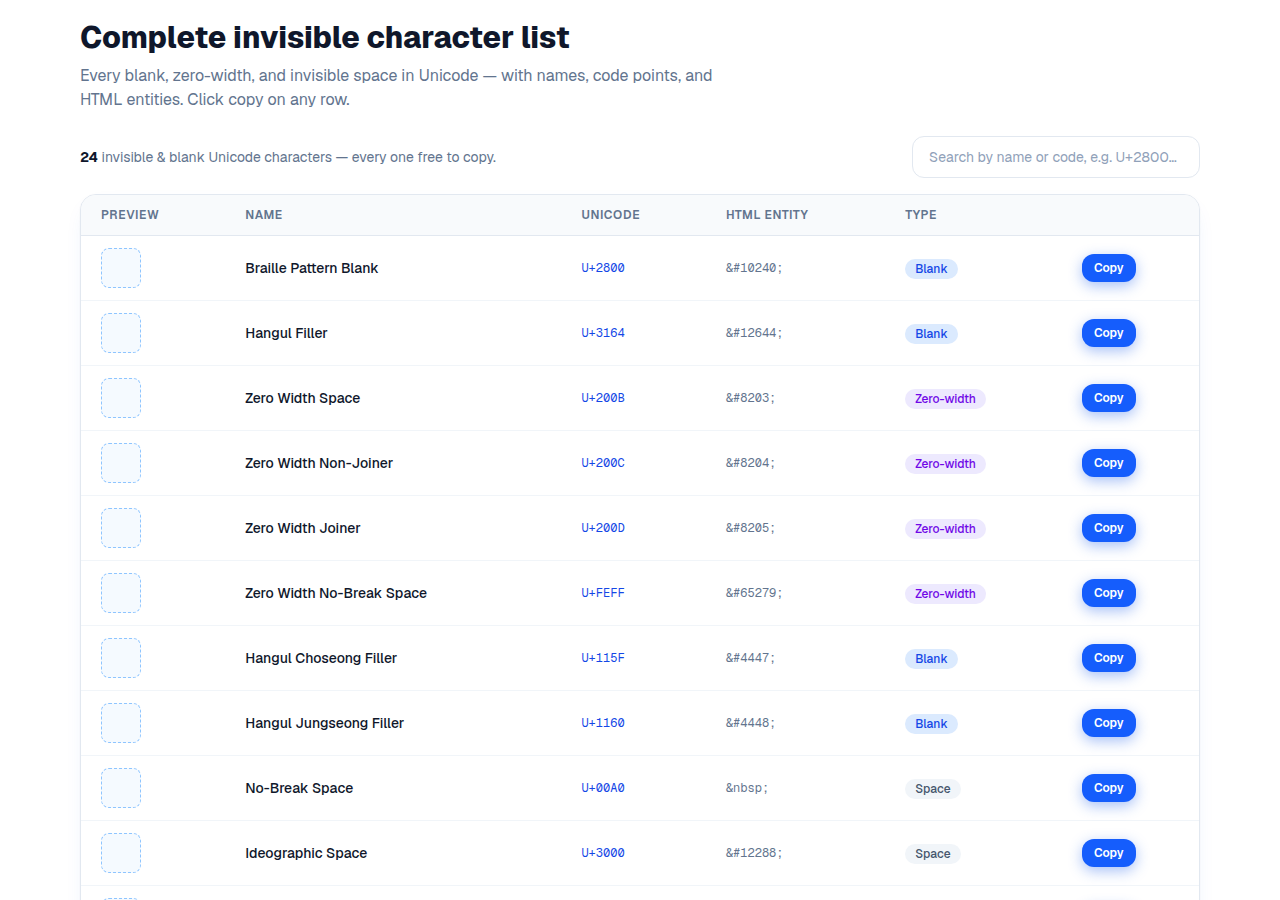
Invisible characters are real Unicode code points that take up space but show as nothing: the Hangul Filler (U+3164 ㅤ), Braille Pattern Blank (U+2800 ⠀), Zero Width Space (U+200B), Invisible Separator (U+2063), and about twenty others. Platforms treat them as text — so they pass validation that rejects empty fields and plain spaces. Grab Invisible text from our homepage and try every trick below in seconds.
Here are the most useful tricks, grouped by platform. Each one works as of this writing — but platforms patch things now and then, so if a character gets rejected, try the next one in the family.
Instagram tricks
Instagram trims normal spaces hard — which is exactly why invisible characters are so useful here:
- Blank bio: clear your bio, paste U+3164 or U+2800, and save. Your profile shows an empty bio.
- Bio line breaks: Instagram collapses truly blank lines. Put one invisible character on each “blank” line and your spacing survives.
- Caption spacing: use U+00A0 (no-break space) on empty lines between paragraphs so your caption keeps its formatting.
- Label-free story highlights: paste an invisible character as the highlight name and you get clean, text-free highlight circles.
- Blank display name: the name field accepts invisible characters and can look completely blank. (The @username is ASCII-only — no trick works there.)
TikTok tricks
TikTok is less predictable than Instagram — it filters invisible characters harder, and behavior changes by app version:
- Blank display name: U+3164 works on many app versions. Test it on yours before committing.
- Blank comments: unreliable. TikTok's comment box actively filters invisible characters, so don't count on this one.
Discord tricks
Discord is the most generous platform for invisible characters — they work in more places here than anywhere else:
- Invisible server nickname: right-click your name, Change Nickname, paste U+2800 or U+3164. You become a blank entry in the member list.
- Blank channel & category names: invisible characters work in channel names and category headers for a clean server layout.
- Invisible role names: a blank role still colors your name and grants permissions. Stealth admin.
- Empty lines in messages: Discord trims truly empty lines, but a line containing one invisible character survives.
- Blank custom status: set your status text to an invisible character for a mysterious presence.
X (Twitter) and Facebook tricks
On X, a blank-looking post works with U+200B (zero-width space) — plain spaces get rejected, but the zero-width space slips through. On Facebook and Messenger, U+2063 (Invisible Separator) is the known-working character for blank posts and comments.
The golden rule: every field filters differently
What works for a display name often fails in a comment box, and vice versa. Every input field has its own filters. If a character gets rejected, walk the fallback chain: U+3164 → U+2800 → U+2063 → U+200B. One of them almost always gets through.
One trade-off to remember: a blank name looks cool, but people can then only find you through your @username. On Instagram the name field is searchable — blanking it costs you discoverability.
Frequently asked questions
U+3164 Hangul Filler is the most versatile — it generally works on WhatsApp, Instagram, Discord, and TikTok. U+2800 Braille Pattern Blank is the best fallback.